SOLID Principles in React: What Every React Developer Should Know
【导读】本文原文来自 Medium(图片自创),主要阐述了 React 开发者如何避免写出屎山代码。文章并不是单纯复述 SOLID 的定义,而是把它翻译到 React 的语境里:组件怎么拆、hooks 怎么放、props 怎么设计、依赖怎么解耦。对我来说,这篇文章最有价值的地方在于,它把“组件为什么会越写越难维护”这件事说得很具体。
【适用场景】如果你正在写中后台页面、组件库、业务表单、列表页,或者你已经开始觉得“这个组件越来越长、越来越不敢动”,那这篇文章会非常有参考价值。
Why React Components Turn Into a Mess
The same 5 rules. But now applied to components, hooks, and the way React actually works.
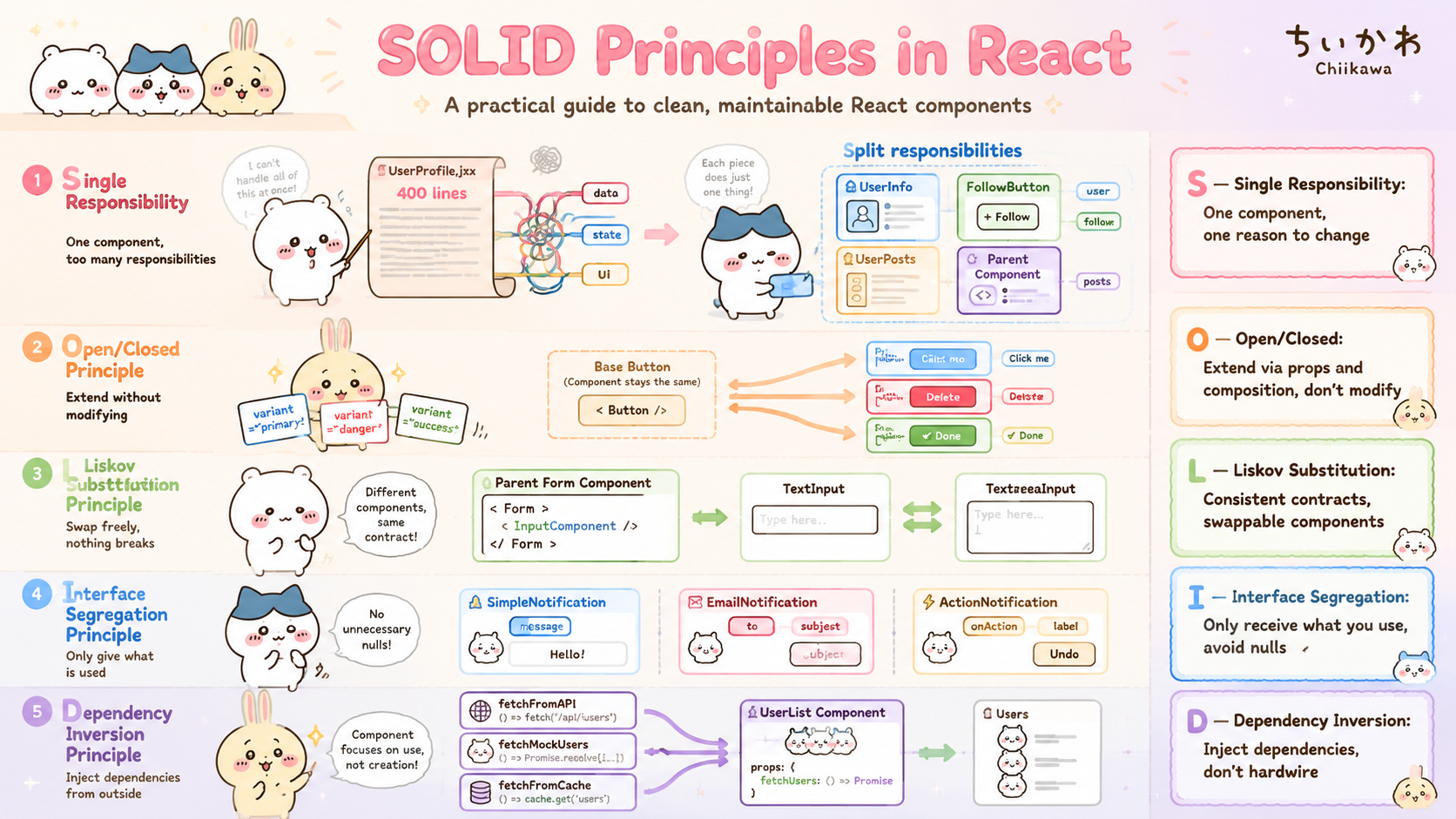
Single resposibility:【 单一职责】;Open-Closed Principle:【开放-封闭原则】;Liskov substitution:【
/ˈlɪskɑːv ˌsʌbstɪˈtuːʃn/里氏替换】;Interface segregation:【/ˈɪntərfeɪs ˌseɡrɪˈɡeɪʃn/接口隔离】;Dependency inversion:【/dɪˈpendənsi ɪnˈvɜːrʒn/依赖倒置】
Where React Projects Start to Hurt
You open a component someone wrote. Or one YOU wrote three months ago. It looks like this:
const UserDashboard = () => {
  // fetching user data  拿用户数据
  // fetching analytics  拿【`/ˌænəˈlɪtɪks/` 分析数据;统计数据】
  // handling form state 处理表单的状态
  // calculating totals
  // managing modals     管理模态框
  // formatting dates    格式化日期
  // 400 lines later...
}
You scroll. You scroll more. You give up.
你往下滑,滑呀滑,然后你就放弃了
This is not a React problem. This is a design problem. And SOLID fixes it — even in React. 【分享】这一段其实点出了全文最重要的前提:很多 React 项目的痛点,并不是 JSX、Hooks 或框架机制本身导致的,而是“组件边界划分错误”。如果组件既管数据、又管状态、又管展示、还管副作用,那项目越往后越容易进入“能跑,但没人敢改”的状态。
How SOLID Maps to React
【译文】SOLID 法则如何映射到 React 中?
In JavaScript, SOLID applies to functions and modules.
solid法则应用在函数和模块(模块应该是包含函数的,re-render的时候只更新函数部分,import的以及这个文件的全局变量都是模块级别的)
In React, SOLID applies to components and hooks.
Same principles. Different context.
一样的原则,不一样的【
/ˈkɑːntekst/场景;上下文】 【译文】原则相同,但应用场景不同。
JS SOLID          →    React SOLID
──────────────────────────────────
Functions         →    Components
Modules           →    Hooks
Dependencies      →    Props
Interfaces        →    Prop contracts
Composition       →    Component composition
The key is the mapping, not the terminology
- 术语注:props 契约 / props 约定,指组件对外暴露的参数接口规范。
- 分享:这一节很关键,因为它把传统面向对象里的 SOLID,翻译成了 React 开发里更常见的对象:组件、hooks、props、组合关系。也就是说,这篇文章并不是在教你死记硬背设计模式,而是在提醒你:React 项目同样需要“抽象边界感”。
- 重点:如果只记一句话,我会记:在 React 里,SOLID 的落点不是 class,而是组件设计、数据流设计和依赖关系设计。
Let’s go through each one.
S — Single Responsibility
“A component should do one thing. And only one thing.”
The Problem
// ❌ This component does everything
// Fetches data, handles state,
// formats display, manages UI logic

const UserProfile = () => {
  const [user, setUser] = useState(null)
  const [posts, setPosts] = useState([])
  const [loading, setLoading] = useState(true)
  const [isFollowing, setIsFollowing] = useState(false)

  useEffect(() => {
    fetch('/api/user')
      .then(res => res.json())
      .then(data => {
        setUser(data)
        setLoading(false)
      })
  }, [])

  useEffect(() => {
    fetch('/api/posts')
      .then(res => res.json())
      .then(data => setPosts(data))
  }, [])

  const handleFollow = () => {
    setIsFollowing(!isFollowing)
    fetch('/api/follow', { method: 'POST' })
  }

  if (loading) return <div>Loading...</div>

  return (
    <div>
      <img src={user.avatar} alt={user.name} />
      <h1>{user.name}</h1>
      <p>{user.bio}</p>
      <button onClick={handleFollow}>
        {isFollowing ? 'Unfollow' : 'Follow'}
      </button>
      <div>
        {posts.map(post => (
          <div key={post.id}>
            <h3>{post.title}</h3>
            <p>{post.body}</p>
          </div>
        ))}
      </div>
    </div>
  )
}
One component. Every responsibility. Every reason to change. 【分析】一个组件承担了初始化页面的所有动作,俗称屎山代码。
A Better Split
Split every responsibility into its own focused piece:
拆分每一份职责为单独聚焦的片段
// ✅ Custom hook — handles data fetching only
const useUserProfile = () => {
  //初始化数据的函数组件
  return { user, loading }
}

// ✅ Component — displays user info only
const UserInfo = ({ user }) => {
  // ...初始化数据的组件
  return (
	{/*...*/}
  )
}

// ✅ Component — handles follow action only
const FollowButton = ({ userId }) => {
	//...处理点击时间,上报关注布尔值的函数
  return (
  {/*渲染关注按钮*/}
    <button onClick={handleFollow}>
      {isFollowing ? 'Unfollow' : 'Follow'}
    </button>
  )
}

// ✅ Component — renders post list only
const UserPosts = ({ posts }) => {
	{/*渲染文章*/}
  return (
    <div>
      {posts.map(post => (
        <div key={post.id}>
          <h3>{post.title}</h3>
          <p>{post.body}</p>
        </div>
      ))}
    </div>
  )
}

// ✅ Parent — only coordinates
// Does NO work itself — just assembles
//【`/koʊˈɔːrdɪneɪts/` 协调;`/əˈsembəlz/` 组装】
【译文】父组件只负责协调和组装,不亲自承担具体业务逻辑。
const UserProfile = () => {
  const { user, loading } = useUserProfile()

  if (loading) return <div>Loading...</div>

  return (
    <div>
      <UserInfo user={user} />
      <FollowButton userId={user.id} />
      <UserPosts posts={user.posts} />
    </div>
  )
}
How I Read This Section
- 分享:单一职责在 React 里的价值,不只是“代码更整洁”,更重要的是把“变化原因”拆开。比如接口改动、交互改动、UI 改动,本来应该是三类不同变化;如果它们都堆在一个组件里,那么任何改动都会互相影响。
- 实战信号:如果一个组件里同时出现了
fetch、多个useState、复杂条件渲染、事件处理函数和大段 JSX,基本就可以判断:这个组件开始越界了。 - 落地建议:最常见的拆分方式就是:数据获取放 hook、行为封装成小组件、展示逻辑留给纯 UI 组件、父组件只负责组装。
- 一句话记忆:一个组件只负责一种变化原因。
- 我自己的理解:单一职责不是为了“拆得好看”,而是为了让未来修改某一块逻辑时,不会顺手把别的逻辑一起带崩。
A Quick Test
Describe your component. If you use the word AND — split it. 你尝试描述一下你的组件,如果你可以使用这个and单词来描述这个大组件能干的事---那你就拆分他。
❌ "Shows user info 【AND】 fetches data AND handles follow"
✅ "Shows user info"
✅ "Fetches user data"
✅ "Handles follow action"
重点:这个判断法非常适合 code review:当你发现自己在描述一个组件时必须不断加“还要”“并且”“顺便”,就说明它大概率承担了多个职责。
O — Open/Closed Principle
“Components should be open for extension but closed for modification.” 组件应该对【
/ɪkˈstenʃn/扩展】开放、对【/ˌmɑːdɪfɪˈkeɪʃn/修改】封闭 【译文】组件应该对扩展开放、对修改封闭。
Add new features without editing existing components.
不改现有原组件来添加新特性(本质是抽离通用逻辑,提高可复用性)
The Problem
// ❌ Every new button type forces you 你为了让一个按钮有不同样式,新建了n个实例去编辑不同的样式
// to edit this component
// Risk of breaking existing button styles

const Button = ({ type, label }) => {
  if (type === 'primary') {
    return (
      <button style={{ background: 'blue', color: 'white' }}>
        {label}
      </button>
    )
  }
  if (type === 'danger') {
    return (
      <button style={{ background: 'red', color: 'white' }}>
        {label}
      </button>
    )
  }
  // Adding "success" type? Edit this file again. 新增按钮需要继续编辑文件。
  // Every edit risks breaking primary and danger.
}
The Fix
// ✅ Base component is closed for modification
// 基准组件(公用逻辑,按钮的架子)禁止修改,通过props来获得不同的实例
// Extend it by passing what changes as props
// 通过传递props值 来【`/ɪkˈstend/` 扩展】

const Button = ({ label, style, onClick, ...rest }) => {
  return (
    <button
      onClick={onClick}
      style={style}
      {...rest}     // accepts any HTML button attribute
    >
      {label}
    </button>
  )
}

// ✅ Each variant is its own extension  每个【`/ˈveriənt/` 变体;整句是“每个变体都是一种独立扩展”】
// Zero modification to Button ever needed

const PrimaryButton = ({ label, onClick }) => (
  <Button
    label={label}
    onClick={onClick}
    style={{ background: 'blue', color: 'white' }}
  />
)

const DangerButton = ({ label, onClick }) => (
  <Button
    label={label}
    onClick={onClick}
    style={{ background: 'red', color: 'white' }}
  />
)

// Adding success button?
// New component. Zero changes to existing code. 不修改已有代码,增量更新
const SuccessButton = ({ label, onClick }) => (
  <Button
    label={label}
    onClick={onClick}
    style={{ background: 'green', color: 'white' }}
  />
)
What This Code Is Really Saying
- 译文:把“会变化的部分”通过 props 传进去,以此扩展组件。
- 译文:每个按钮变体都是一种独立扩展。
- 分享:开放-封闭原则在 React 里最常见的落点,就是“保留稳定骨架,把变化点参数化”。像按钮、表单项、弹窗、列表项这类基础组件,最怕的是后期不断往内部塞分支,把一个通用组件改成条件地狱。
- 实战收益:这样做的好处是:新增能力时,你是在增加新组合,而不是冒险修改旧逻辑。对组件库、设计系统、业务中台组件尤其重要。
- 常见误区:开放-封闭并不意味着“基础组件永远不能改”,而是说:新增业务变化时,优先考虑扩展点设计,而不是不断侵入原组件内部。
- 一句话记忆:稳定骨架不要乱动,把变化点暴露出来。
- 我自己的理解:React 里的开放-封闭,本质上很像“先设计插槽,再承接变化”,而不是等业务来了再疯狂补 if/else。
L — Liskov Substitution
“Swap one component for another — nothing should break.” 把一个组件替换成另一个组件时,不应该出问题 【译文】里氏替换原则。 【译文】把一个组件替换成另一个组件时,不应该导致系统出问题。
The Problem
// ❌ These two inputs behave differently 这两个输入会得到不同的效果
// Swapping one for the other breaks your form  【`/swæp/` 替换】

// 箭头函数的简写,相当于省略了【{ return】(。。。
const TextInput = ({ value, onChange }) => (  // 这里是参数解构
  <input
    type="text"
    value={value}
    onChange={onChange}
    // onChange gives: event object
  />
)

const CustomInput = ({ value, onValueChange }) => (
  <input
    type="text"
    value={value}
    onChange={(e) => onValueChange(e.target.value)}
    // Different prop name + gives string not event
    // Swapping breaks the parent component
  />
)
【术语注】它接收的属性名变成了 onValueChange,而且回调拿到的是“字符串值”,不是原来的 event 事件对象。
【译文】这样一替换,父组件就会因为调用方式不一致而出错。
The Fix
// ✅ Both components have identical contracts
// Same props. Same behavior. Freely swappable.
// 同样的props,同样的行为,【`/ˈswɑːpəbəl/` 可替换的】

const TextInput = ({ value, onChange, placeholder }) => (
  <input
    type="text"
    value={value}
    onChange={onChange}
    placeholder={placeholder}
  />
)

const TextareaInput = ({ value, onChange, placeholder }) => (
  <textarea
    value={value}
    onChange={onChange}
    placeholder={placeholder}
  />
)

// Parent does not care which one renders
// Swap freely — nothing breaks
const CommentForm = ({ useTextarea = false }) => {
  const [value, setValue] = useState('')

  const InputComponent = useTextarea ? TextareaInput : TextInput

  return (
    <form>
      <InputComponent
        value={value}
        onChange={(e) => setValue(e.target.value)}
        placeholder="Write a comment..."
      />
    </form>
  )
}
What This Code Is Really Saying
- 译文:两者拥有相同的 props 接口和相同的行为,因此可以自由替换。
- 译文:父组件不需要关心最终渲染的是哪一个输入组件,随时替换也不会出问题。
A Quick Test
Swap
_ComponentA_with_ComponentB_. If the parent breaks — Liskov is violated.
How I Read This Section
- 分享:里氏替换在 React 场景下,最容易被忽略的地方不是“UI 长得像不像”,而是“对外契约是否一致”。看起来都叫 Input,但只要 props 名、返回值语义、事件模型不一样,父组件就不得不写特殊分支。
- 重点:所以这里真正要守住的不是“长得像”,而是:同类组件应该拥有一致的 props 契约和行为预期。
- 实战场景:这类问题在封装输入框、选择器、日期组件、弹窗组件时特别常见。一开始觉得都差不多,后面一替换才发现事件签名、默认值、受控/非受控行为全都不一致。
- 一句话记忆:能互换的前提,是接口和行为都一致。
- 我自己的理解:这条原则在前端里特别像“别让相似组件长着同一张脸、说着两套语言”。
I — Interface Segregation
“Components should not receive props they don’t use.” 组件不应该接收不用的props参数
The Problem
// ❌ One massive component that handles everything
// Callers pass null for things they don't need

// 数组解构按顺序,对象解构按名字优先
const NotificationBanner = ({
  type,
  email,
  phone,
  deviceToken,
  message,
  avatarUrl,
  actionLabel,
  onAction
}) => {
  if (type === 'simple') {
    // Only uses message
    // email, phone, deviceToken, avatarUrl all ignored
    return <div>{message}</div>
  }

  if (type === 'email') {
    // Only uses email and message
    // phone, deviceToken ignored
    return <div>Email to {email}: {message}</div>
  }
}

// Caller forced to pass nulls everywhere
// 【`/ˈkɔːlər/` 调用方;这里不是“自动设为 null”,而是调用方被迫手动传 null】
<NotificationBanner
  type="simple"
  email={null}       // not needed
  phone={null}       // not needed
  deviceToken={null} // not needed
  message="Done!"
  avatarUrl={null}   // not needed
  actionLabel={null} // not needed
  onAction={null}    // not needed
/>
【译文】调用方被迫到处传 null,即使这些参数根本用不到。
The Fix
// ✅ Specific components for specific needs
// 颗粒度吧反正就是,精细化组件
// Each caller only knows what it needs

// Only needs message
const SimpleNotification = ({ message }) => (
  <div className="notification">
    {message}
  </div>
)

// Only needs email + message
const EmailNotification = ({ email, message }) => (
  <div className="notification">
    Sending to {email}: {message}
  </div>
)

// Only needs phone + message
const SMSNotification = ({ phone, message }) => (
  <div className="notification">
    SMS to {phone}: {message}
  </div>
)

// Only needs action props
const ActionNotification = ({ message, actionLabel, onAction }) => (
  <div className="notification">
    <p>{message}</p>
    <button onClick={onAction}>{actionLabel}</button>
  </div>
)

// Clean callers — no nulls, no dead props
<SimpleNotification message="Done!" />
<EmailNotification email="user@mail.com" message="Welcome!" />
<ActionNotification
  message="File ready"
  actionLabel="Download"
  onAction={handleDownload}
/>
A Quick Test
Look at your component’s props. Is the caller ever passing
_null_for something? If yes — your component is too broad. 看一下你组件的props,【/ˈkɔːlər/调用方】是不是经常为了凑参数而传null?如果是,就说明这个组件太宽泛了。
How I Read This Section
- 译文:调用方是不是经常为了凑参数而传
null?如果是,就说明这个组件职责范围太大了。 - 分享:接口隔离在 React 里非常实用,因为它直接关系到组件 API 是否“好用”。一个组件 props 越多、可选项越杂,调用方越容易迷惑,类型定义也会越来越臃肿。
- 实战信号:一旦你发现调用方经常传
null、undefined、空函数、空字符串,往往不是调用方写得差,而是组件本身承担了太多模式。 - 落地建议:遇到这种情况,优先考虑拆成多个更小、更明确的组件,而不是继续给一个大组件补更多“可选开关”。
- 一句话记忆:谁用什么,就只暴露什么。
- 我自己的理解:一个组件的 props 像 API,一旦又长又杂,调用方的认知负担会指数上升。
D — Dependency Inversion
“Components should not hardwire their dependencies. Inject them from outside.” 组件不应该把依赖【
/ˈhɑːrdwaɪər/写死】在内部,而应该从外部【/ɪnˈdʒekt/注入】。
【译文】依赖倒置原则。
This is where dependency injection through props comes in.
【译文】这正是通过 props 实现【/dɪˈpendənsi ɪnˈdʒekʃn/ 依赖注入】的典型场景。
The Problem
// ❌ Component is hardwired to fetch from one place
// Cannot reuse with different data sources
// Cannot test without hitting real API

const UserList = () => {
  const [users, setUsers] = useState([])

  useEffect(() => {
    // Hardwired — cannot swap this out
    // 硬编码 - 【`/ˌhɑːrdˈwaɪərd/` 写死了,不能灵活替换】
    fetch('https://api.myapp.com/users')
      .then(res => res.json())
      .then(data => setUsers(data))
  }, [])

  return (
    <ul>
      {users.map(user => (
        <li key={user.id}>{user.name}</li>
      ))}
    </ul>
  )
}
The Fix
Inject the Dependency
【译文】修复方式——把依赖注入进来。
// ✅ Component does not care where data comes from
// 组件不关心数据从哪里来
// The fetch function is injected from outside
// fetch 函数由外部【`/ɪnˈdʒekt/` 注入】

const UserList = ({ fetchUsers }) => {
  const [users, setUsers] = useState([])

  useEffect(() => {
    // Uses whatever function the parent provides
    // 不管父组件给了什么函数,组件只负责调用并消费结果
    fetchUsers().then((data) => setUsers(data))
  }, [fetchUsers])

  return (
    <ul>
    {/*map渲染数据*/}
      {users.map((user) => (
        <li key={user.id}>{user.name}</li>
      ))}
    </ul>
  )
}

// Real usage — production API
// 在线上环境传入真实接口
const fetchFromAPI = () =>
  fetch('https://api.myapp.com/users').then((res) => res.json())

<UserList fetchUsers={fetchFromAPI} />

// Mock usage — testing
// Promise.resolve 会立刻返回一个成功态 Promise
const fetchMockUsers = () =>
  Promise.resolve([
    { id: 1, name: 'Alice' },
    { id: 2, name: 'Bob' },
  ])

<UserList fetchUsers={fetchMockUsers} />

// Different source — no rewrite needed
const fetchFromCache = () =>
  Promise.resolve(JSON.parse(localStorage.getItem('users') ?? '[]'))

<UserList fetchUsers={fetchFromCache} />
A More Real-world Pattern
有些时候,外部注入的不一定只是一个请求函数,也可能是整套数据获取逻辑,比如一个自定义 hook。
// ✅ Even cleaner — inject the entire hook

// Production hook
const useAPIUsers = () => {
  const [users, setUsers] = useState([])

  useEffect(() => {
    fetch('/api/users')
      .then((res) => res.json())
      .then(setUsers)
  }, [])

  return users
}

// Mock hook for testing
const useMockUsers = () => [
  { id: 1, name: 'Alice' },
  { id: 2, name: 'Bob' },
]

// Component accepts the hook — does not hardwire it
const UserList = ({ useUsers }) => {
  const users = useUsers()

  return (
    <ul>
      {users.map((user) => (
        <li key={user.id}>{user.name}</li>
      ))}
    </ul>
  )
}

// Swap freely — zero changes to UserList
<UserList useUsers={useAPIUsers} />
<UserList useUsers={useMockUsers} />
How I Read This Section
- 译文:
fetch函数由外部传入,而不是在组件内部写死。 - 术语注:立即返回一个成功状态的 Promise,括号里的值会作为异步结果被拿到。
- 分享:依赖倒置在前端里非常有工程价值,因为它直接决定一个组件能不能方便地测试、复用和替换数据源。组件里一旦把 API 地址、服务调用、埋点逻辑全部写死,后期测试和迁移的成本会迅速上升。
- 重点:这里的关键词不是“高深架构”,而是两个很接地气的目标:更容易 mock,更容易替换。
- 实战场景:比如同一个列表组件,在线上读真实接口,在 Storybook 里读 mock 数据,在单测里读 stub,在离线模式下读缓存;如果依赖是注入的,这些都能做到,而且不需要改组件本身。
- 一句话记忆:组件负责使用依赖,不负责制造依赖。
- 我自己的理解:依赖倒置一旦做好,组件会明显“轻”很多,因为它不再背着请求来源、环境差异、测试替身这些额外负担。
Seeing the Five Principles Together
S → One component, one job
    Split components like you split functions

O → Extend through props and composition
    Never modify existing components to add features

L → Consistent prop contracts across similar components
    Swap components freely without breaking parents

I → Components only receive what they use
    No null props. No dead props.

D → Inject dependencies through props and hooks 通过props和hooks【`/ɪnˈdʒekt dɪˈpendənsiz/` 注入依赖】
    Components don't hardwire fetch calls or services
    组件不要【`/ˈhɑːrdwaɪər/` 把依赖写死】
Quick Summary
- 译文:通过 props 和 hooks 注入依赖。
- 译文:组件不要把请求逻辑或服务依赖硬编码在内部。
- 总结:这五条放在一起看,其实是在回答同一个问题:怎样让 React 组件在“变复杂”之前,仍然保持清晰、稳定、可替换。
- 总结:S 解决的是职责边界,O 解决的是扩展方式,L 解决的是替换一致性,I 解决的是接口粒度,D 解决的是依赖来源。把这五条串起来看,整篇文章的逻辑就会非常清楚。
- 一句话记忆:SOLID 不是五个孤立概念,而是一套组件边界治理方法。
From Functional Thinking to Engineering Thinking
React 开发者的思维转变。
Before SOLID: “How do I make this component work?”
【译文】我怎么先让这个组件跑起来?
After SOLID: “How do I make this component focused, replaceable, and independent?”
【译文】我怎么让这个组件专注于一件事、可替换、可独立演进?
This is the difference between a developer who writes React and a developer who architects with React.
【译文】这就是“会写 React” 和 “会用 React 做工程设计” 之间的差别。
【分享】这里的“architects with React” 不一定是指职位上的架构师,而是说:你开始用“边界、职责、依赖、替换成本”的视角去看组件,而不是只关注“页面先渲染出来再说”。这其实就是工程思维和功能思维的差别。
Make AI Follow These Rules Too
A Simple Before/After
Every principle you just read can be turned into a rule.
【译文】你刚刚读到的每一条原则,其实都可以转成明确规则。
And rules can be given to AI agents.
【译文】而这些规则,是可以直接交给 AI agent 去执行的。
The Shift in How You Work With AI
【术语注】Shift【/ʃɪft/】:转变,这里指你和 AI 协作方式的变化。
Before understanding SOLID:
You ask AI → "Build me a UserProfile component"
AI gives you → One giant component doing everything  一个【`/ˈdʒaɪənt/` 巨型的】组件做了所有事
You accept it → Ship it → Regret it in 3 months 你接受了它,你【`/ʃɪp/` 发布上线】了它,三个月后后悔。

After understanding SOLID:
You ask AI → "Build me a UserProfile component
              following these rules..."
AI gives you → Focused components, clean hooks,
               injected dependencies  【`/ɪnˈdʒektɪd dɪˈpendənsiz/` 注入进来的依赖】
You review it → Ship it → Thank yourself in 3 months 你人工review它,然后【`/ʃɪp/` 发布上线】它,三个月后回看,感谢自己。
How I Read This Section
- 译文:一个包办所有事情的巨型组件。
- 译文:你接受它、把它上线,三个月后开始后悔。
- 译文:你审查它、把它上线,三个月后会感谢现在的自己。
- 译文:关键不在 AI,本质区别在于:你是否足够理解这些规则,并且能明确要求 AI 遵守它们。
- 总结:这一段其实把全文从“代码设计”延伸到了“如何使用 AI 生成代码”。如果你自己没有清晰的组件设计标准,AI 只会放大混乱;但如果你知道该怎么拆职责、控边界、做注入、守契约,AI 就会变成高效的实现助手。
- 总结:所以这篇文章最适合的阅读方式,不是把 SOLID 当成定义背下来,而是把它当成一套 React 组件审查清单:这个组件职责单一吗?可扩展吗?可替换吗?参数干净吗?依赖写死了吗?
- 我自己的理解:AI 写代码的上限,很多时候取决于提问者的组件设计意识。你脑子里有没有边界,最终会直接反映在 AI 生成的代码质量上。
One-line Summary Table
| 原则 | 一句话说清楚 |
|---|---|
| S — 单一职责 | 一个组件只负责一种变化原因,不要把数据、交互、展示和副作用全堆在一起。 |
| O — 开放封闭 | 新增功能优先靠扩展和组合,而不是不断回头修改稳定组件。 |
| L — 里氏替换 | 同类组件要能互换,前提是 props 契约和行为预期一致。 |
| I — 接口隔离 | 不要让调用方为了凑参数传一堆 null,组件只暴露真正需要的接口。 |
| D — 依赖倒置 | 组件不要把依赖写死在内部,尽量从外部注入,方便测试、替换和复用。 |
【总结】如果用一句更口语的话概括全文,那就是:React 组件不是先写大了再拆,而是从一开始就要守住职责、边界、契约和依赖。